
TAOApp Wallet has launched a browser beta that brings several Bittensor account types into one interface. Ledger, proxy and multisig accounts are included.
The September 1 release is available for Chrome, Brave and Edge, according to TAOApp. Its public documentation covers standard software accounts, Ledger, Polkadot Vault, watch-only addresses, proxies, pure proxies and multisigs.
This is product reporting, not a security endorsement. Tao Outsider has not installed the extension, connected a wallet, signed a transaction or audited the implementation. Every capability described below comes from TAOApp’s own documentation.
One interface, several different account roles
Bittensor account setups become difficult to read when the address holding assets is different from the account allowed to sign an action. TAOApp’s documentation makes that separation central.
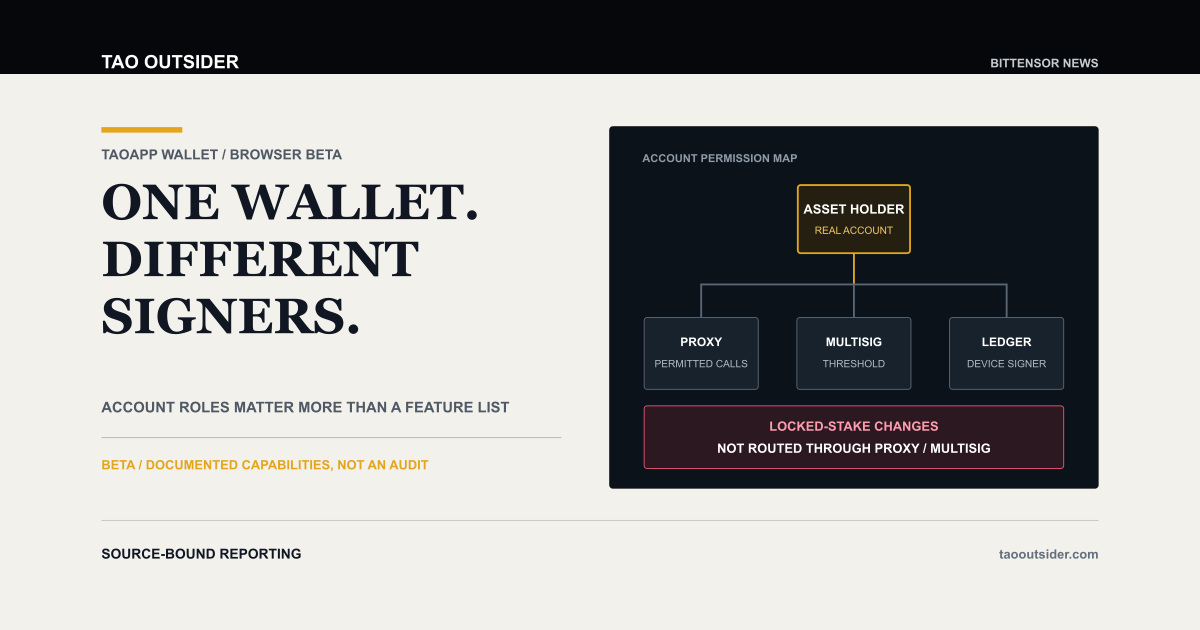
A real account can hold funds or stake while a proxy delegate signs only the actions permitted by an on-chain relationship. A pure proxy is a seedless on-chain account controlled through proxy relationships. A multisig requires a configured threshold of member approvals. Ledger and Polkadot Vault keep signing on external devices.
Those roles can overlap. A software or Ledger account can act as a proxy controller or multisig signatory. A multisig can control a pure proxy that holds assets. Seeing all of them in one account list may reduce a common source of confusion, but the interface cannot remove the underlying permission model.
The distinction matters most at the moment of action. The account whose balance changes, the route that authorizes the change and the device that supplies the signature may be three different things.
A multisig approval is not the finished operation
TAOApp’s multisig documentation separates the approval threshold from final submission. A 2 of 3 setup has three members and needs any two approvals. The operation is complete only after the required threshold is reached and the final transaction is submitted.
A delayed proxy can add another waiting stage after multisig approval. The documentation also notes that the selected signatory normally pays the multisig transaction fee unless a nested proxy route identifies another payer. Higher-threshold operations may require a deposit.
These are useful interface details because an approval recorded in the wallet should not be confused with an executed on-chain change. They remain vendor-documented behavior. Tao Outsider did not test a pending operation, delayed route or final submission.
Ledger changes where the signature happens
For Ledger accounts, TAOApp says the hardware device stores the private key while the extension prepares the request. The device confirms and signs each action. The wallet documentation specifies ed25519 accounts and says their seeds cannot be exported from the extension.
That architecture can reduce exposure of private keys to browser storage, but it does not make every transaction correct or safe. A hardware signer still depends on the user checking the origin, account, call and fee presented for approval. Ledger has not endorsed this article, and no independent compatibility test was performed.
Locked stake exposes an important beta boundary
The clearest limitation in the current documentation concerns locked stake.
TAOApp says proxy, pure-proxy, multisig and watch-only accounts can view lock information, but the present action flow does not route lock changes through those account types. A directly signing software, Ledger, Polkadot Vault or development account is required for the supported lock actions.
Displaying a locked position therefore does not mean the selected account can add to the lock, move it to another validator or switch its mode. This is especially relevant after Bittensor’s Conviction changes, where locked alpha and ownership can carry material consequences.
The limitation also shows why a long feature list needs account-level qualification. Support for proxies and multisigs in ordinary staking flows does not create universal support for every locked-stake call.
What the security page proves, and what it does not
TAOApp publishes a detailed security model. It says private data is stored in an encrypted vault using PBKDF2 and AES-GCM. After the user opens the vault, session material remains in browser session storage so it can survive extension worker suspension and clear when the browser closes.
The page also lists accepted trade-offs. Public addresses and network topology can be cached without encryption. A recovery phrase copied by the user remains on the clipboard until the user clears it. The derived vault key is exported into memory-backed session storage while the vault remains open.
Publishing these choices is more useful than a vague claim of security because readers can see the intended boundaries. It is still the vendor’s description of its own system. The materials reviewed here do not establish an independent audit, freedom from vulnerabilities or that TAOApp is the safest Bittensor wallet.
TAOApp has assembled several account paths that Bittensor operators often manage across separate tools. The beta now needs the evidence that only use and outside review can provide: correct call construction, clear signer context, predictable recovery and independent security scrutiny.
Sources
TAOApp Wallet beta announcement
TAOApp account types and capability table
TAOApp Ledger account documentation
TAOApp multisig account documentation
TAOApp proxy account documentation
TAOApp locked-stake documentation
TAOApp self-custody security model
Was this article useful?
One tap feedback helps us improve each post.